 Why It Went to Spam
How do I write an SPF record?
Short answer
Start with v=spf1, add every server or service that sends mail as your domain, and finish with ~all or -all. Publish it as a single TXT record on your domain. Keep the record to 10 DNS lookups or fewer, or the whole check fails.
The detail
An SPF record is one line of text. It names the servers allowed to send mail for your domain. If you're not sure what SPF does, read what SPF is first. Then build the record in this order.
Step 1: List everyone who sends as you
Your record must cover every server that sends mail for your domain.[1] That's more than your main mailbox. Google's list includes web servers, contact forms, and any outside service that sends for you.[1]
Go through your tools one by one. Think of your mailbox, newsletter, online store, booking system, billing system and helpdesk. Each one that sends as @example.com needs a place in the record.
Step 2: Build the line
Every record starts with v=spf1.[1] After that come the parts that list your senders. The standard calls these parts mechanisms. These are the ones you'll use most:
| Mechanism | What it means | Example |
|---|---|---|
ip4: |
This IPv4 address or range may send[2] | ip4:192.0.2.10 |
ip6: |
This IPv6 address or range may send[2] | ip6:2001:db8::/32 |
include: |
Also accept whatever this other domain's SPF record allows[2] | include:_spf.example.net |
a |
The server your domain name points to may send[2] | a |
mx |
The servers that receive your mail may also send it[2] | mx |
all |
Everyone else. It always goes last[2] | -all |
Write ranges in full, like 192.0.2.0/24. You can't just leave off the end of the address.[2]
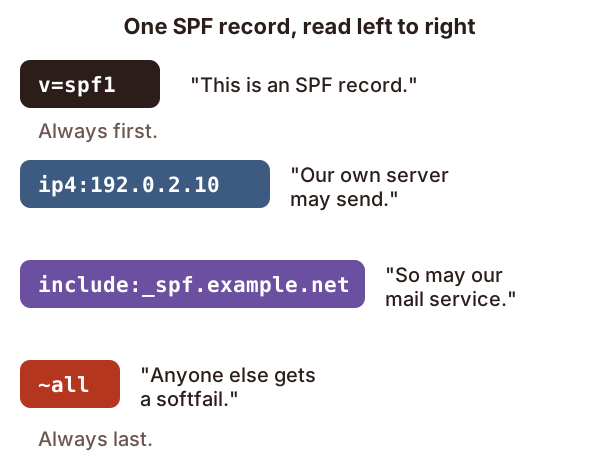
Services that send for you usually tell you which include: to add. This record is for a domain with one server of its own. It also uses one outside service.
v=spf1 ip4:192.0.2.10 include:_spf.example.net ~all
Step 3: Choose how to end it
The last part, all, matches every server not listed before it.[2] Anything after it is ignored.[2] The symbol in front of it sets the result for those servers:
-allmeans fail. "Nobody else may send for us."~allmeans softfail. "Nobody else should, but don't be too harsh."?allmeans neutral. "We're not saying."
Google recommends ~all.[1] Never leave the ending off. A record with no ending behaves as if it ended in ?all.[2] A mechanism with no symbol in front counts as +, which means pass.[2] So all on its own would let every server in the world pass.
Step 4: Publish exactly one record
Add the line as a TXT record on your domain, at your DNS host. Your domain may have only one SPF record.[2]
This catches people out all the time. A new service says "add this SPF record", so you add a second one. Now SPF breaks for all your mail. Instead, copy the service's include: into your existing line.
Step 5: Count your lookups
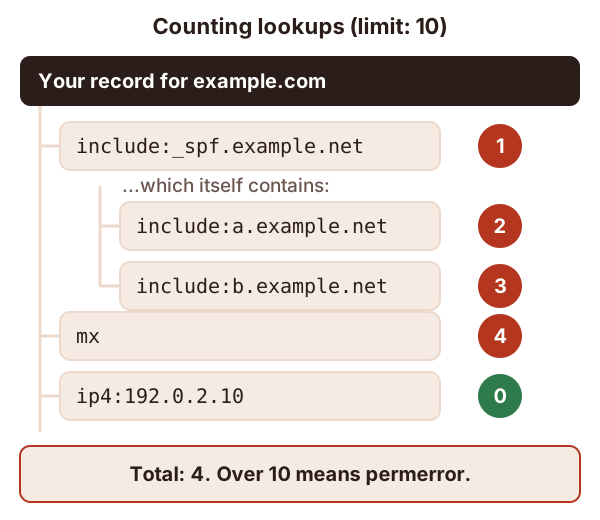
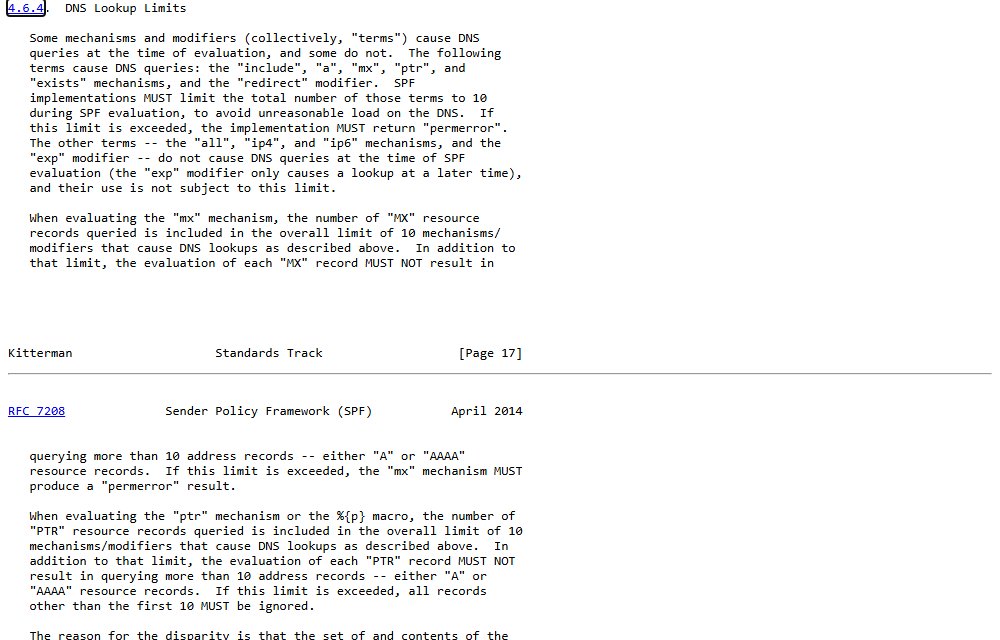
To check your record, a receiving server sometimes has to look up other DNS records. These parts each cost one lookup: include, a, mx, ptr, exists and redirect.[2] The parts ip4, ip6 and all cost nothing.[2]
The limit is 10 lookups.[2] Go over and the result is permerror, so SPF fails for every message.[2] Microsoft warns about the same thing.[3]
Here's the catch. Each include: brings in another domain's record, and that record gets checked too.[2] Its own lookups count against your 10.
The standard spells out the limit in section 4.6.4.
A few more rules from the standard:
- Lookups that find nothing should be limited to two.[2] Remove
include:lines for services you no longer use. - Skip
ptr. The standard marks it "do not use".[2] - If you're near the limit, swap an
includeforip4:ranges, but only if they won't change. Ask the service first.
Step 6: Test it
Send a message to an address you control at Gmail, Outlook.com or Yahoo. Then look for spf=pass in the headers. See how to read email headers.
Sources
- Set up SPF, Google Workspace Admin Help (accessed 2026-10-18)
- RFC 7208: Sender Policy Framework (SPF), IETF (accessed 2026-10-18)
- Strengthening Email Ecosystem: Outlook's New Requirements for High-Volume Senders, Microsoft (accessed 2026-10-18)