 Why It Went to Spam
What is SPF?
Short answer
SPF (Sender Policy Framework) is a list of the servers allowed to send mail for your domain, published in your DNS. A receiving server checks the sending server against that list. It checks the hidden envelope address, not the From address people see, so SPF alone can't stop a fake From line.
The detail
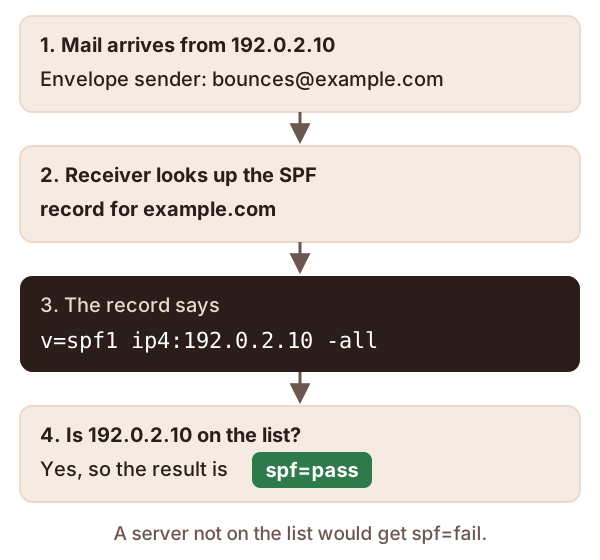
SPF lets a domain owner say which servers may send mail using that domain's name.[1] Think of it as a guest list. When mail arrives, the receiving server checks whether the sending server is on the list.
The list lives in your domain's DNS, as a TXT record.[1] Here's a tiny one for example.com:
v=spf1 ip4:192.0.2.10 -all
It says: "The server at 192.0.2.10 may send for example.com. Nobody else may." How to write your own has the full syntax.
Every email has two "from" addresses
This is the part that trips most people up.
The first is the envelope sender. Servers use it while passing the message along.[2] You usually don't see it. It often shows up later in a header called Return-Path.[2] Bounce messages go back to this address.[2]
The second is the From address. It's the one your mail app shows.[2]
They don't have to match. Say you send a newsletter through an outside service. Readers see From: [email protected]. But the envelope sender might be [email protected], an address the service owns, so it can collect bounces.
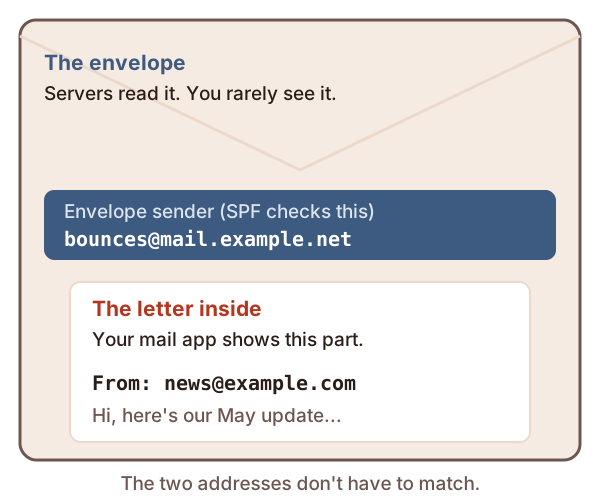
SPF checks the envelope sender's domain, not the From address.[2] In the example above, SPF looks up the record for mail.example.net, not example.com.
What the results mean
An SPF check ends with one word. You'll see it in a message's headers.
| Result | What it means |
|---|---|
pass |
The server is on the list.[1] |
fail |
The domain says this server is not allowed.[1] |
softfail |
The domain says the server is "probably not" allowed. It's a weaker no.[1] |
neutral |
The domain chose not to say either way.[1] |
none |
No SPF record was found.[1] |
temperror |
A short-lived lookup problem. Trying again may work.[1] |
permerror |
The record is broken and someone has to fix it.[1] |
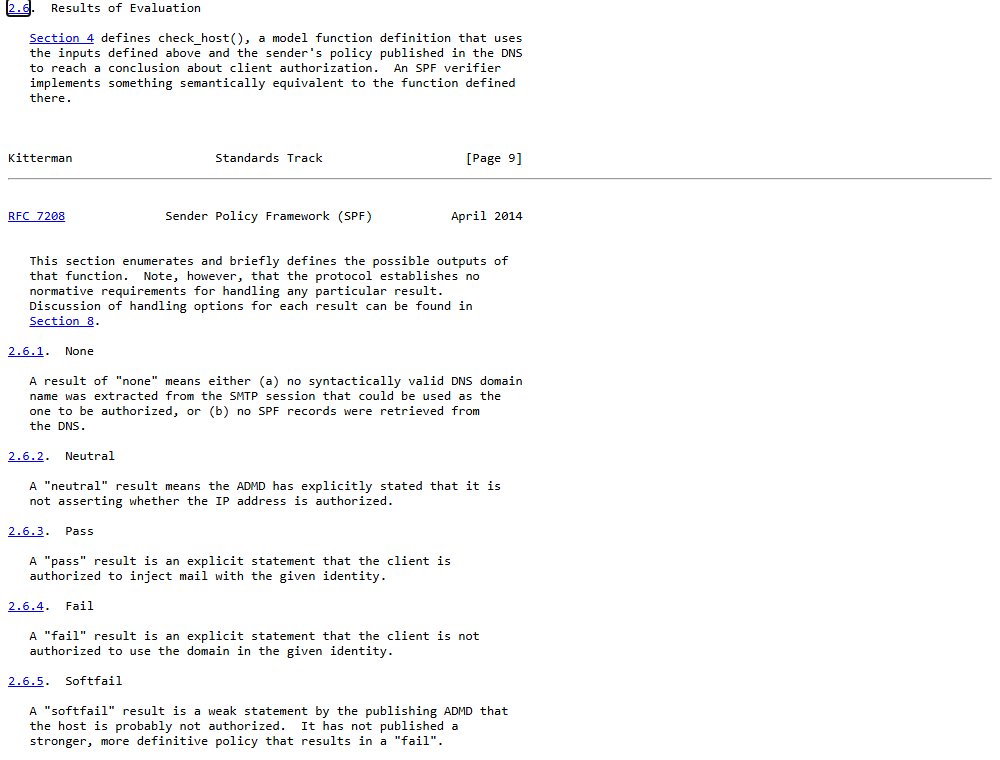
The standard itself lists these results. Here's that part of RFC 7208:
What SPF can't do on its own
It doesn't protect the From line. A spammer can pass SPF with their own domain on the envelope. They can still put your name in the From line.[1] SPF says nothing about that.[2]
It breaks when mail is forwarded. Say a reader forwards their old work address to a new mailbox. The forwarding server isn't on your list, so SPF fails, even though your mail is real.[2]
It doesn't cover subdomains. A record for example.com does nothing for shop.example.com. Each needs its own.[2]
That's why SPF has two partners. DKIM signs the message, so it survives forwarding much better. DMARC links SPF and DKIM to the From address readers actually see.
Checks to try, in this order
- Find the SPF result in the headers of a recent message. See how to read email headers.
- Note which domain was checked. It's the envelope domain, which may not be yours.
- If the result is
failorsoftfail, list every service that sends as you. Then check each one is in your record. - If the result is
permerror, the record itself is broken. The SPF record guide covers the usual causes.
Sources
- RFC 7208: Sender Policy Framework (SPF), IETF (accessed 2026-10-18)
- How email authentication works in Microsoft 365, Microsoft Learn (accessed 2026-10-18)